Responding to a Learning Management System Data Breach: A Step-by-Step Guide for Schools and Universities
Overview
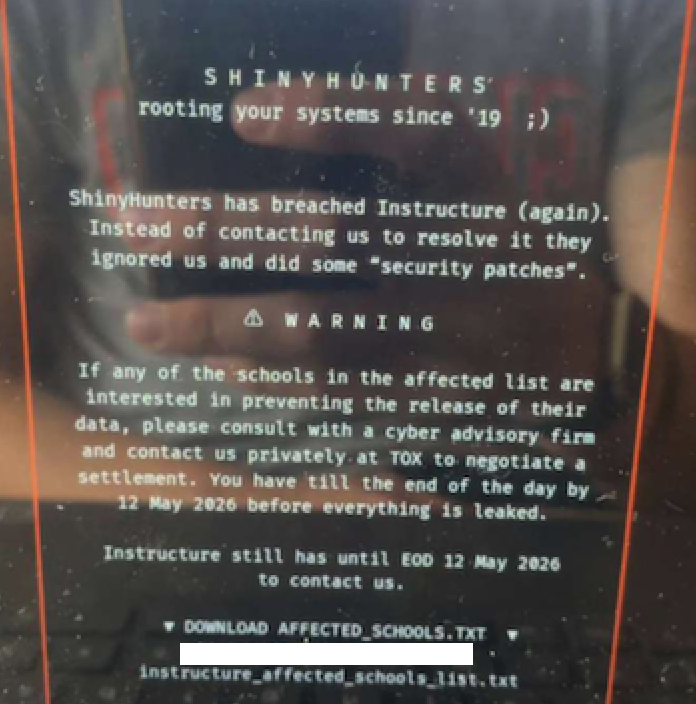
In early May 2025, the education technology platform Canvas, used by thousands of schools and universities worldwide, suffered a severe data breach and defacement attack orchestrated by the cybercrime group ShinyHunters. The attackers accessed and threatened to leak data from over 275 million students and faculty across nearly 9,000 institutions. They defaced the login page with a ransom demand, causing widespread disruption during final exam periods. This guide walks you through understanding the incident, responding to a similar breach in your own LMS, and implementing preventive measures. The goal is to help IT administrators, school leaders, and cybersecurity teams navigate such crises with clarity and confidence.

Prerequisites
Before you begin, ensure you have the following:
- Basic knowledge of cybersecurity concepts (e.g., breach response, ransomware, data classification).
- Access to your institution’s incident response plan or the ability to create one.
- Administrator credentials for your Learning Management System (LMS) and related systems (e.g., Canvas, Blackboard, Moodle).
- Communication channels to reach IT staff, legal counsel, and public relations contacts.
- Backup of critical data and system configurations (if available).
- A timeline and log of recent system activity (e.g., server logs, change logs).
Step-by-Step Instructions
Step 1: Identify and Confirm the Breach
The first sign of a breach may come from unusual system behavior, such as a defaced login page or ransom demand (as seen in the Canvas incident). To confirm:
- Check your LMS login portal from multiple networks (internal and external). If you see unauthorized messages, take screenshots immediately.
- Review security logs and alerts from your SIEM or monitoring tools. Look for unauthorized access patterns, especially from known malicious IPs or unusual geographic locations.
- Communicate with your IT team to ensure no one else triggered the change. Verify that the service is truly compromised, not just a misconfiguration.
Step 2: Isolate Affected Systems
To prevent further damage, quickly isolate the compromised LMS from the network. In the Canvas breach, Instructure disabled the platform entirely and replaced it with a maintenance message. Follow similar steps:
- Take the LMS offline by disabling public access (e.g., edit DNS records, disable web server). Use a temporary static page to inform users without revealing breach details.
- Disconnect the LMS from integrated systems (e.g., student information systems, email services) to prevent lateral movement.
- Capture forensic data before restarting: preserve logs, memory dumps, and disk images. Do not power down the system until you’ve collected evidence.
Step 3: Assess the Scope of Data Exposure
Determine what data was accessed and exfiltrated. According to Instructure’s investigation, the stolen data included names, email addresses, student IDs, and messages — but not passwords, dates of birth, or financial data. To assess your own breach:
- Search for indicators of compromise (IOCs) like unusual file accesses or large outbound data transfers. Use tools like Wireshark or your firewall logs.
- Scan for known attacker signatures (e.g., ShinyHunters’ typical tools) using threat intelligence feeds.
- Engage a third-party forensics team if your institution lacks in-house expertise. They can help identify the exact records impacted.
Step 4: Notify Relevant Stakeholders
Timely communication is critical. In the Canvas incident, the company issued a statement on May 6, then updated later during the defacement. Your notification should follow a structured path:
- Internal notification — Alert your executive team, legal counsel, and IT incident response group. Use a secure channel (e.g., Signal, encrypted email).
- Law enforcement reporting — Contact local cybercrime units and the FBI IC3 (if in the US). Provide all collected evidence.
- Affected user notification — Once the scope is clear, inform students and faculty via email or a dedicated webpage. Be transparent about the data types compromised (e.g., names and messages, but not SSNs).
- Media and regulators — If required by law (e.g., GDPR, state breach notification laws), issue a public statement. Use the same timeline as Instructure: acknowledge the breach, state containment measures, and provide updates.
Step 5: Implement Mitigation and Recovery
After containing the breach, restore services securely. Instructure’s approach—pulling the platform offline, then restoring with a maintenance message—can be adapted:
- Patch the vulnerability that allowed the breach (e.g., SQL injection, weak API keys). Work with your vendor if it’s a software flaw.
- Reset passwords and force MFA for all affected users. Canvas data did not include passwords, but assume they could be derived.
- Restore from a clean backup taken before the compromise. Verify integrity.
- Bring the LMS back online gradually — start with a limited user group to test security.
- Monitor for residual attacker activity for at least 30 days post-restoration.
Step 6: Long-Term Prevention
Prevent future breaches by strengthening your LMS security posture:
- Enable multi-factor authentication for all users, especially administrators.
- Conduct regular penetration testing of your LMS and associated infrastructure.
- Maintain offline backups of critical data and system configurations.
- Develop and test an incident response plan that includes a communication template for breach notifications.
- Stay informed about threat actors targeting EdTech — ShinyHunters is known for data extortion; monitor forums and threat intel feeds.
Common Mistakes and How to Avoid Them
- Delaying notification — Waiting too long to inform users can erode trust and increase legal liability. Follow the Canvas timeline: acknowledge quickly even without full details.
- Paying the ransom without verification — ShinyHunters demanded payment to prevent data leaks. Paying rarely guarantees data deletion and may encourage further attacks. Instead, negotiate through law enforcement if necessary.
- Ignoring the “maintenance” cover-up — After the defacement, Canvas showed a maintenance message. While useful for isolation, ensure you communicate the real reason internally to avoid confusion.
- Failing to preserve evidence — Restarting or patching systems too early can destroy forensic artifacts. Always capture logs and images first.
Summary
The Canvas breach by ShinyHunters exposed millions of student records and caused severe disruption during exams. By following this guide—identifying the breach, isolating systems, assessing data impact, notifying stakeholders, and implementing recovery steps—you can respond effectively to a similar LMS compromise. Remember: rapid containment, transparent communication, and long-term prevention are key. Stay vigilant, and update your incident response plans based on lessons from this attack.
Related Articles
- 10 Critical Cybersecurity Threats from Mid-May 2025: Attacks, AI Dangers, and Unpatched Flaws
- How Meta Fortifies End-to-End Encrypted Backups: A Technical Walkthrough
- Microsoft Unleashes Agent 365 to Combat Shadow AI Crisis in Enterprises
- Inside the Scattered Spider Cybercrime Operation: A Q&A on the Guilty Plea of 'Tylerb'
- Recreating Tudor Fire Darts: Tests Reveal Deadly Potential of Mary Rose Weaponry
- From SMiShing to SIM Swapping: Anatomy of the Scattered Spider Attack (Based on the Tylerb Case)
- Mastering a Dynamic Zero-Trust Network Simulation: Graph-Based Micro-Segmentation, Adaptive Policy Engine, and Insider Threat Detection
- Foxconn Cyberattack: Q&A on the Ransomware Incident Affecting North American Factories