How to Evaluate AI Coding Agents: A Step-by-Step Benchmark Guide for Developers
Introduction
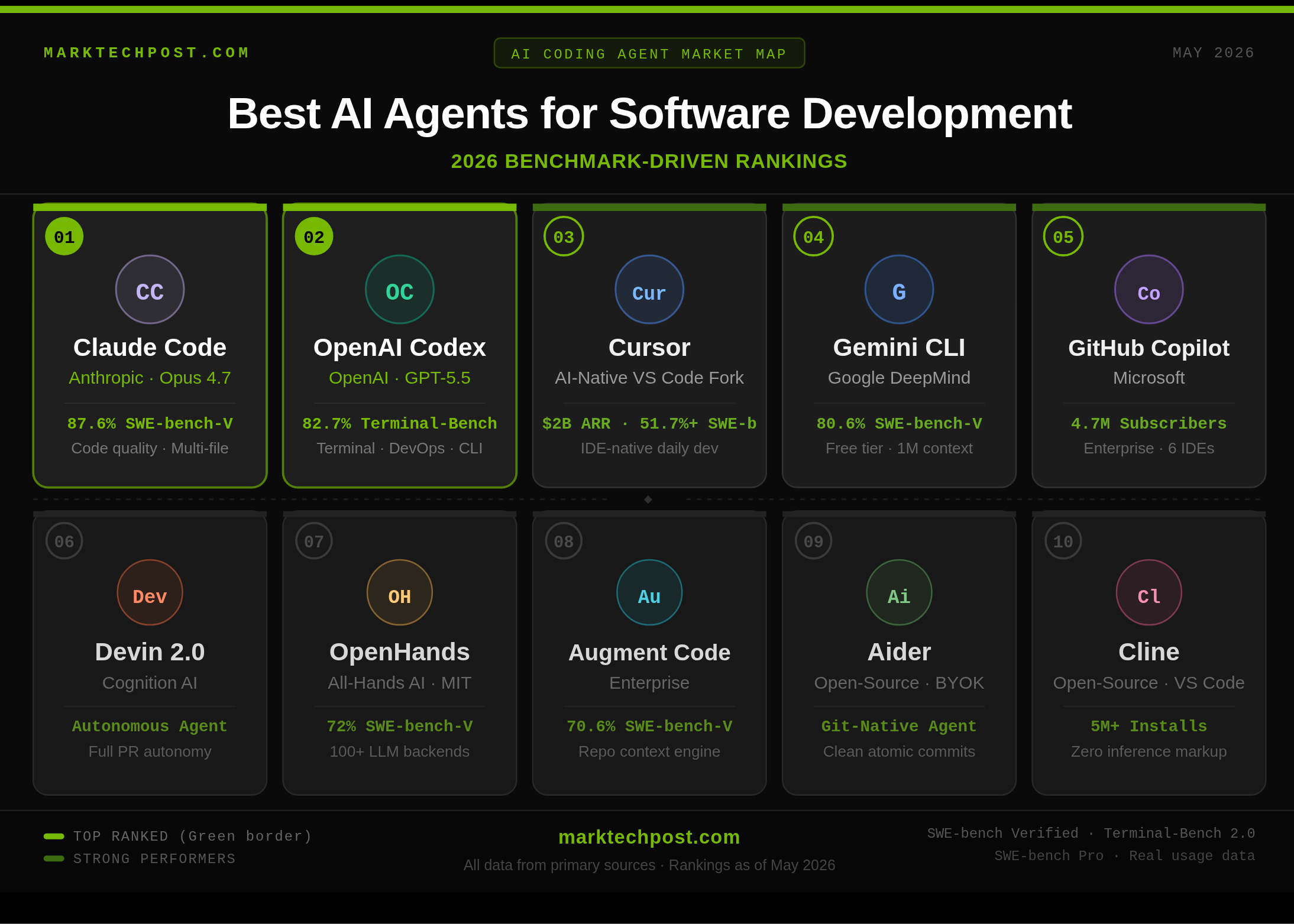
The AI coding agent market has transformed dramatically since 2024. What began as inline autocomplete now includes fully autonomous systems that read GitHub issues, navigate multi-file codebases, write fixes, execute tests, and open pull requests without human intervention. By early 2026, approximately 85% of developers reported regularly using some form of AI assistance for coding. With tools ranging from terminal agents to AI-native IDEs to cloud-hosted autonomous engineers, selecting the right one is critical. Benchmarks like SWE-bench have been the standard, but recent revelations—including OpenAI's decision to stop reporting SWE-bench Verified scores due to training data contamination and flawed test cases—demand a more informed evaluation approach. This guide provides a step-by-step method to assess AI coding agents using credible metrics, ensuring your investment yields real productivity gains.
What You Need
- Access to primary benchmarks: SWE-bench Verified results (historical) and SWE-bench Pro (recommended). Visit Step 3 for details.
- List of target AI coding agents: For example, GPT-5.2, Claude Opus 4.5, Gemini 3 Flash, or open-source frameworks.
- Real-world test scenarios: A sample GitHub issue from your own project or a public repository.
- A testing environment: A local or cloud setup where you can run the agent on a task and observe its behavior.
- Time commitment: Allow at least 2-3 hours to complete all steps thoroughly.
Step-by-Step Guide
Step 1: Understand the AI Coding Agent Landscape
Before diving into benchmarks, know the major archetypes. Terminal agents (e.g., Codex CLI) operate via command line, AI-native IDEs (e.g., Cursor) integrate deeply with editors, cloud-hosted autonomous engineers (e.g., Devin) handle end-to-end tasks, and open-source frameworks (e.g., LangChain) allow model swapping. Each has strengths; your choice depends on workflow. Familiarize yourself with at least three agents from different categories.
Step 2: Learn the Key Benchmarks
Two benchmarks dominate: SWE-bench Verified and its successor SWE-bench Pro. SWE-bench Verified tests agents on 500 real GitHub issues from Python repos, measuring end-to-end problem solving. However, as of February 23, 2026, OpenAI's Frontier Evals team found that 59.4% of hard problems had flawed test cases, and all major models could reproduce gold patches from memory using task IDs—proving training data contamination. Consequently, OpenAI now recommends SWE-bench Pro, which is designed to resist contamination and remain valid for frontier evaluation. Other labs still use SWE-bench Verified, but treat its scores with caution.
Step 3: Gather SWE-bench Pro Scores
Visit the SWE-bench Pro official page (swebench.com/pro) and collect the latest scores for your candidate agents. These scores represent a more reliable measure of real-world code generation ability. Record both pass rates and task completion times. If SWE-bench Pro data is unavailable for a specific agent, cross-reference with independent evaluations from trusted sources (e.g., academic papers or community reviews). Avoid relying solely on vendor-reported numbers.
Step 4: Run a Custom Validation Test
Benchmarks are proxies; real projects vary. Create a test using a GitHub issue from your own codebase. Pick a moderate bug or feature request with clear acceptance criteria. Feed the issue to each agent and observe:
- Does it correctly parse the problem?
- How does it navigate your project structure?
- Does it produce a fix that passes your existing test suite?
- Does it open a pull request autonomously?
- What is the full time from issue to PR?
Compare results across agents, noting subjective qualities like code readability and adherence to your style.

Step 5: Assess Autonomous End-to-End Capability
Beyond single fixes, evaluate multi-step workflows. For example, ask the agent to refactor a module, update tests, and document changes. The best agents handle this chain without human interruption. Use a checklist:
- Reads and understands a multi-file issue.
- Generates code across files.
- Executes tests and iterates on failures.
- Commits and opens a PR with description.
Score each agent on a 1-5 scale for autonomy.
Step 6: Consider Real-World Factors
Benchmarks don't capture everything. Evaluate:
- Latency: How fast does the agent respond?
- Cost: Per-task or subscription fees.
- Integration: Does it work with your IDE, CI/CD, and version control?
- Security: Does it handle sensitive code safely?
- Community: Is there active support and documentation?
Weigh these against pure performance metrics.
Step 7: Make Your Decision
Compile a comparison table using your test results, SWE-bench Pro scores, and real-world factors. Choose the agent that best fits your team's workflow and budget. Remember, no single tool is perfect—often a combination of a terminal agent for quick fixes and an AI IDE for complex refactoring works best.
Tips for Success
- Stay updated on benchmark changes: The SWE-bench landscape evolves. Follow announcements from OpenAI and other labs to avoid relying on outdated scores.
- Run tests on representative tasks: Your project's language, framework, and complexity matter. A Python-focused benchmark may not reflect JavaScript performance.
- Involve your team: Gather feedback from colleagues who will actually use the agent. Tool adoption hinges on user satisfaction.
- Start with a trial: Most agents offer free tiers or demos. Test before committing to a subscription.
- Document your evaluation: Keep a record of scores and observations for future reference when new agents emerge.
By following these steps, you'll cut through marketing hype and select an AI coding agent that genuinely accelerates your development workflow.
Related Articles
- How AI Is Revolutionizing Chinese Short Dramas: 8 Key Transformations
- One Laptop to Rule Your Engineering Studies: Why the Asus Zenbook 14 OLED Reigns Supreme
- A CEO's Sabbatical: Steering Three Companies Beyond the Corner Office
- The Dreame FP10: A Self-Cleaning Air Purifier That Pet Owners Will Love
- How to Migrate a Hyperscale Data Ingestion System: A Step-by-Step Guide
- How to Break the Context Barrier: Leveraging 12-Million-Token Windows with Subquadratic
- Inside Meta's High Court Battle Over UK Online Safety Fees: 8 Key Facts
- How to Track AI Spending in Amazon Bedrock with IAM Cost Allocation